Revolutionize Your Creative Workflow with Direct Event Binding
 PRO | DRAGON 🐉
REVOLUTIONIZE YOUR CREATIVE WORKFLOW WITH DIRECT BINDING
As Fortnite Creative gears up for its v25 update, a new era in device communication is about to begin, with direct event binding becoming the default system. This significant change will bring a more intuitive and flexible approach to designing game mechanics, allowing for increased complexity and diversity. So let's explore the importance of converting your existing islands to event binding and the advantages it brings!
A MAJOR SHIFT IN CHANNEL COMMUNICATION
Direct event binding represents a major shift from the channel communication system. With devices communicating directly, users no longer need to worry about reaching the maximum channel limit or preplanning channel allocation. Additionally, copying and pasting devices with direct event binding retains the original events and functions, eliminating the need for manual channel reassignment.
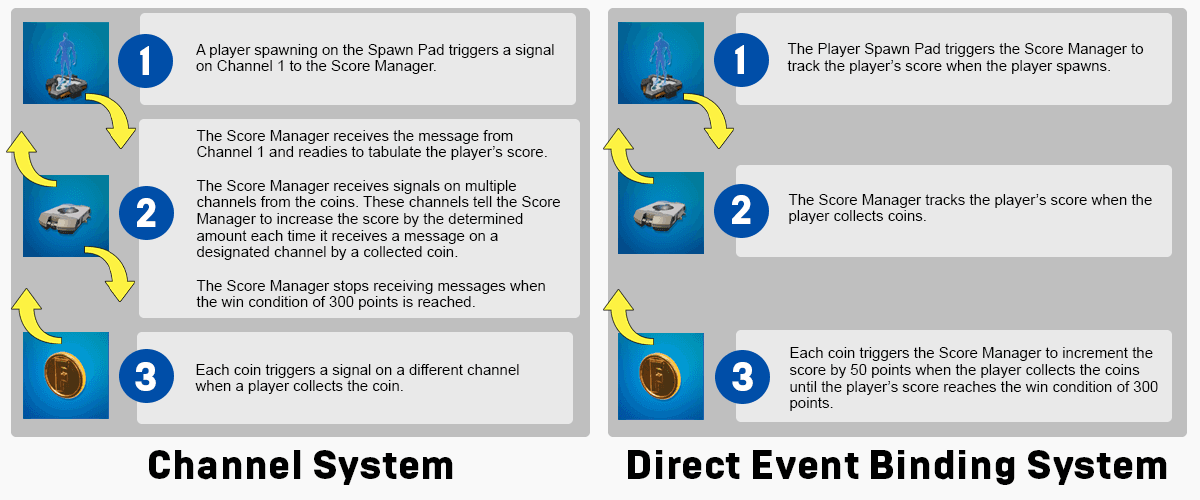
The new system introduces events and functions, replacing the traditional transmitter and receiver options. Events are activated by a device or a player's action, triggering functions in other devices. Direct event binding binds events in one device to functions in another, streamlining the communication process.
HOW DIRECT EVENT BINDING WORKS
Direct event binding employs device names instead of channels to specify events and functions occurring between devices. While devices are automatically assigned a unique identifier, renaming them with meaningful and descriptive names is crucial for maintaining clarity in your projects.
As the v25 update approaches, it's essential to start preparing for the transition to direct event binding. The current opt-in system will soon become mandatory, making it important to determine which projects need adjustment. It's recommended to create a copy of your existing islands and test the conversion on the copies first, as creating copies of islands will no longer be an option after the update.
Adopting direct event binding offers numerous advantages, including a more efficient workflow for building islands and the ability to implement crucial changes simultaneously. For example, with direct event binding, a Button device can be easily set up to turn on a Customizable Light when a player interacts with it. The On Interact Send Event To event on the Events tab connects the Button device to the Customizable Light device, and the Turn On function is selected next to the device.
In case you haven't transitioned your islands yet and require additional guidance, there are several tutorials available for you to view immediately!
Preparing for UEFN 2.0:Event Binding Tutorial
Creator: DirectingPete
Event Binding 101 : Fortnite: Creative (Coding)
Creator: ImmatureGamer
How to Use the New Event Binding System in Fortnite Creative!
Creator: Sweatboi
NEW LEAP FORWARD
In conclusion, the transition to direct event binding in Fortnite Creative's v25 update marks an exciting leap forward in device communication and island design capabilities. By converting your existing islands to this new system, you can unlock a world of possibilities for complex and diverse game mechanics. Embrace the future of Fortnite Creative with direct event binding and experience the benefits of a more intuitive and powerful creative platform.
Are you ready for the change? Lets chat about it in the FCHQ Discord https://discord.gg/fchq

.
Comments
You must be logged in to comment.